Langdock Apps:
your own tools without code
Langdock Apps turns a description in chat into an application with an interface, its own database and AI features. From 17 November 2026 Apps is visible to all users of a workspace. In Langdock Core apps can be shared with up to 5 people, in Langdock Work also with groups and the whole workspace.
By Dennis Cutraro, Co-Founder and Managing Partner · As of:
What Langdock Apps is and what is new
Langdock Apps is an app builder inside the chat: you describe the application in your own words and watch it take shape right next to it. To change something, you simply say so. Nobody needs to write code.
Until now Langdock offered two routes to a tool of one's own: agents that answer questions in chat, and HTML files that the chat creates in the Document Editor, formerly called Canvas. Such an HTML file has an interface, but it does not store input and only knows the data that was uploaded to the chat beforehand. As soon as it is closed, its state is gone.
Apps close that gap. Every app stores input in its own database, reads from systems such as SharePoint, Salesforce or Google Drive through the workspace integrations and can call AI models, for example to sort requests or summarise text. Other users open a shared app in Langdock like any other tool, with their own permissions.
At Unfuture we have worked with Apps as beta testers since October, among other things to review the ratings of our Academy. The examples further down come from that time and from workshops with clients.
Where to find Langdock Apps
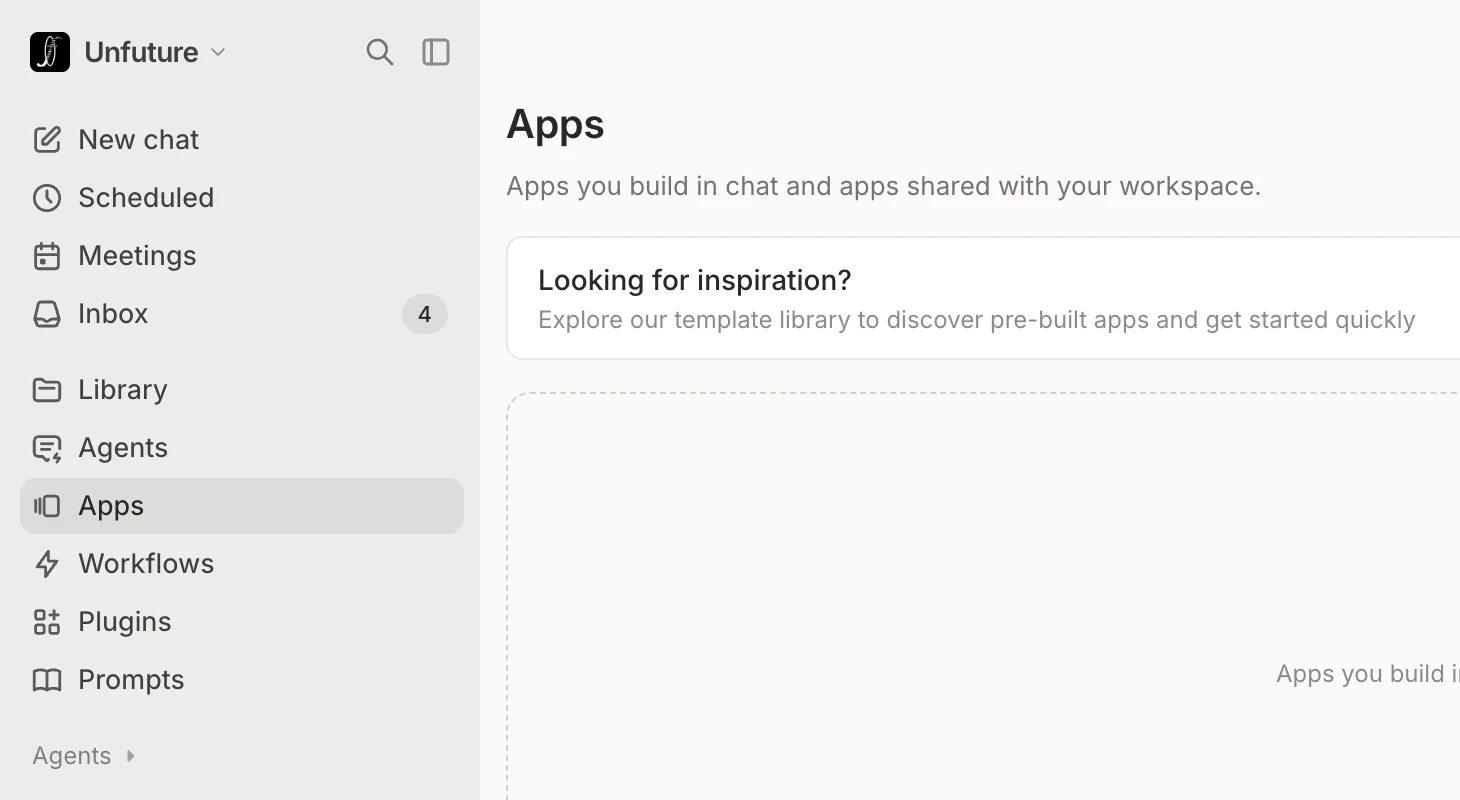
Apps sits in the left sidebar between Agents and Workflows. The Apps page lists your own apps and those shared with you.
If the entry is missing, the admin has not granted access yet. Until 17 November 2026 admins can first test Apps themselves or enable it only for selected groups. After that the section is visible to all users unless an admin turns it off.
Building an app, step by step
Building an app requires the Create apps permission in addition to access to Apps, and sharing it also requires Share apps. The admin assigns both through workspace roles. We advise clients to grant Create apps widely and give Share apps to only a few people at first. That way many drafts get built, but only what someone has reviewed gets shared.
What Langdock Apps can and cannot do
The feature set covers typical internal tools, but the limits are clearly drawn: an app only runs inside Langdock, and its code stays there.
With integrations, every person uses their own connection inside an app and decides which actions the app may run through it. An app therefore never sees more data than the person currently using it is allowed to see. Anyone without access to a folder in a connected system will not see its contents in the app either.
Works in the app
Stays outside
Its own database
Input stays stored in the app, and several people work from the same state.
Apps, agents, workflows and HTML files: the difference
The four tools differ mainly in who triggers them and whether data is kept. Only apps combine an interface of their own with stored data.
An agent waits in chat for a question or runs at fixed times under Scheduled, as a daily briefing for example. A workflow, by contrast, starts on its own and evaluates the incoming quotes every Monday, for example. In an app several people enter data or look things up, and the state is kept.
Langdock Apps or Claude Code
Langdock Apps is aimed at business teams that need an internal tool without dealing with the technology. Claude Code from Anthropic is a coding agent that writes code in a repository of your own. Where and how the software runs is then the team's decision and job.
Both generate software from a description, and with both you can now build without programming skills. The difference is everything that comes after. A Langdock app runs in the workspace, where the database, sign-in, permissions, integrations and EU hosting already exist. For normal use nobody has to write or read code. It still needs checking: whether the app calculates correctly, which data it accesses and who is responsible for it. The code itself stays in Langdock and can be neither edited nor exported.
Claude Code works in the terminal or IDE directly in a repository. Which database the app uses, where it runs and how people sign in is for the team to decide and set up. Someone has to review, ship and maintain the code. In return the result belongs to the team and can call any interface. A separate product for coding agents, Langdock Code, has been announced but is not available yet.
What should your tool do?
Langdock Apps is the better choice
The business team describes it, Langdock builds, stores and runs the app. Nobody has to look after the database, hosting or updates.
What you can build with Langdock Apps
We use three of these apps at Unfuture ourselves, three came out of projects and workshops with clients. Each prompt can be copied and pasted in chat after “Help me create the following app:”, with the parts in square brackets replaced by your own data source.
Prompt
A dashboard for course ratings. Load ratings and comments from [data source, e.g. a SharePoint list]. At the top, the number of ratings and the average per client. Below, a table per lesson, lowest first, with the comments. AI sums up the criticism per lesson in one sentence and flags what comes up repeatedly.
Langdock Apps in Core and Work
Langdock Core does not limit the number of apps but how widely they are shared: each app reaches at most 5 people. Giving an app to a group or the whole workspace requires Langdock Work.
Work costs 10 euros more per user per month than Core for the first 50 licences on monthly billing, and less in the higher tiers and on annual billing. The full tiers of both plans are listed in Langdock pricing.
Work also includes Governance, which gives admins an overview of all apps, their sharing and integrations. Core includes Governance only until 1 January 2027.
What admins can set before the rollout
Before the rollout we settle four points with clients. Two are settings in the admin area, two are agreements within the company.
Deadline 17 November
From 17 November 2026 Apps is visible to everyone unless the admin turns the section off under Products or limits it to groups.
Separate roles
Create apps and Share apps are separate permissions. Building can therefore be opened up widely while sharing stays with a few people.
Data in apps
An app with its own database is small software. Which data may live there is decided by the company, not by the app.
An owner per app
A shared app does not change by itself when the process behind it changes. Without a person responsible, it goes out of date.
Frequently asked questions
Sources
- docs.langdock.com: Apps
- docs.langdock.com: Create and edit an app
- docs.langdock.com: Limits and troubleshooting
- docs.langdock.com: Document Editor
- langdock.com: Security
- langdock.com/pricing: licences and prices
Screenshots from the Unfuture workspace on 4 November 2026. The animation in the guide is a recreation.
Author
Dennis Cutraro is Co-Founder and Managing Partner of Unfuture. Unfuture is a Langdock Expert Partner and used Apps and Meetings as a beta tester before launch.