Langdock Meetings:
minutes and next steps, automatically
Langdock Meetings transcribes conversations and then writes a summary with next steps from the transcript. The records stay searchable and can be queried in chat later. Langdock Core includes 10 per month, Langdock Work as many as you like.
By Dennis Cutraro, Co-Founder and Managing Partner · As of:
Where to find Langdock Meetings
Meetings sits in the sidebar right below Scheduled. At the top the page shows how many transcriptions are left in the current month, next to Get desktop app and New recording.
What is new is mainly where the transcript ends up. Until now, what was said stayed in personal notes or in a separate tool the Langdock chat could not access. With Meetings, every transcript becomes context that chat and agents in the same workspace can use without anyone exporting or uploading it first.
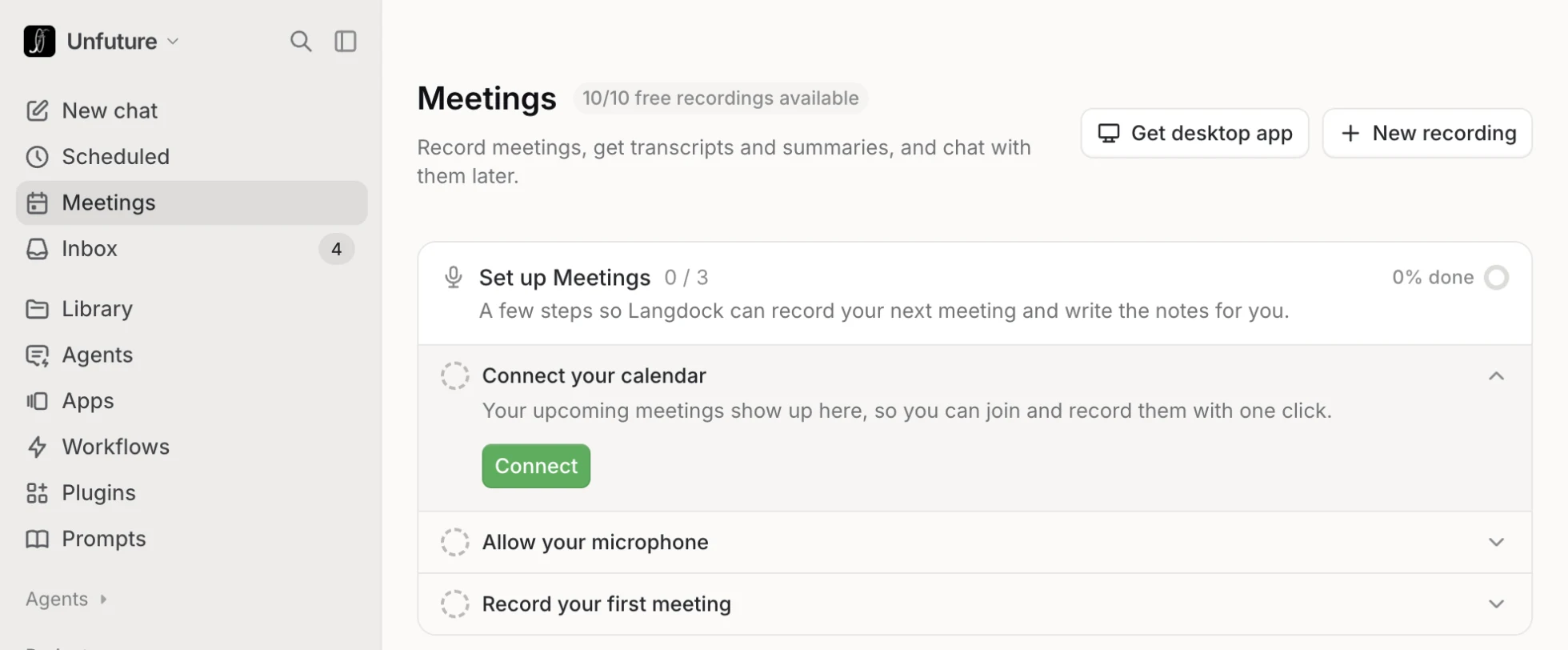
Setting up Langdock Meetings
The Meetings page guides you through setup in three steps: connect the calendar, allow the microphone and record the first meeting. Online calls also require the desktop app.
The biggest difference lies in the choice between browser and desktop app. In the browser Langdock only hears the user's own microphone, which is enough for conversations in the same room. Only the desktop app also captures the call audio and with it the other participants. It also detects when a call starts and sends a reminder beforehand.
Calendar
Google or Outlook
- Link your account through Connect. Outlook needs Microsoft 365.
- Events for the next 31 days then appear under Coming up and can be recorded with one click.
Desktop app
Mac from macOS 14.2, Windows from 10
- Download it with the Get desktop app button on the Meetings page.
- It transcribes both sides of an online call. The browser only records your own microphone, which is enough for conversations in the same room.
Permissions
Microphone, system audio, accessibility
- The microphone records your own voice.
- System audio records the others on the call. Windows needs no separate permission.
- Accessibility is Mac only. Langdock uses it to read who is speaking and put the names in the transcript.
Language
German, English, Spanish, French, Italian
- Choose the language in your personal settings.
- If a conversation switches between two languages, everything is still transcribed.
How a meeting with Langdock works
Conversations on site start with New recording, which also works in the browser. If a recording is stopped too early, Resume continues it for up to 24 hours without using up another transcription. Finished meetings can be filed in folders and shared with colleagues.
Data protection: announce it and get consent
Recording happens on your own computer, so nothing in the call itself shows it. Announce the recording and ask everyone beforehand. Langdock reminds you of this when you start.
A transcription requires a legal basis under Art. 6 GDPR, in practice usually the consent of those involved. Where there is a works council, co-determination under § 87(1) No. 6 BetrVG has to be settled before rollout. Admins can enable a watermark that shows everyone the transcription is running, and decide who may share transcripts and whether they are visible at all. If transcripts are hidden, only the summary remains.
Announcement
At the start, participants are told that Langdock is transcribing and asked for consent. Langdock shows a reminder when recording begins.
Watermark
Admins can enable a notice that shows all participants, external ones included, that a transcription is running.
Private until shared
Transcripts belong to the person who started them. Your own notes stay private even when the meeting is shared.
Works council
From 17 November 2026 Meetings is visible to everyone unless the admin restricts it. Co-determination has to be settled before that date.
Are 10 meetings enough? Core or Work
Langdock Core includes 10 transcriptions per user per month. Langdock Work removes that limit and only applies fair use of up to 60 hours per user per week.
A transcription counts when it starts, not by its length. A start that fails before any audio does not count, and neither does a meeting continued via Resume. The allowance resets every month, and once it is used up, existing transcripts remain available.
Work costs 10 euros more per user per month than Core for the first 50 licences on monthly billing, and less in the higher tiers and on annual billing; the full tiers are listed in Langdock pricing.
Frequently asked questions
Sources
- docs.langdock.com: Meetings
- docs.langdock.com: Getting started with Meetings
- docs.langdock.com: Transcribing meetings
- langdock.com/pricing: licences and prices
- EUR-Lex: General Data Protection Regulation, Art. 6
- gesetze-im-internet.de: § 87 BetrVG
Screenshot from the Unfuture workspace on 4 November 2026; the flow is a recreation. Not legal advice.
Author
Dennis Cutraro is Co-Founder and Managing Partner of Unfuture. Unfuture is a Langdock Expert Partner and used Apps and Meetings as a beta tester before launch.